


Full source base ZJB-52
Model: ZJB-52
Product Overview
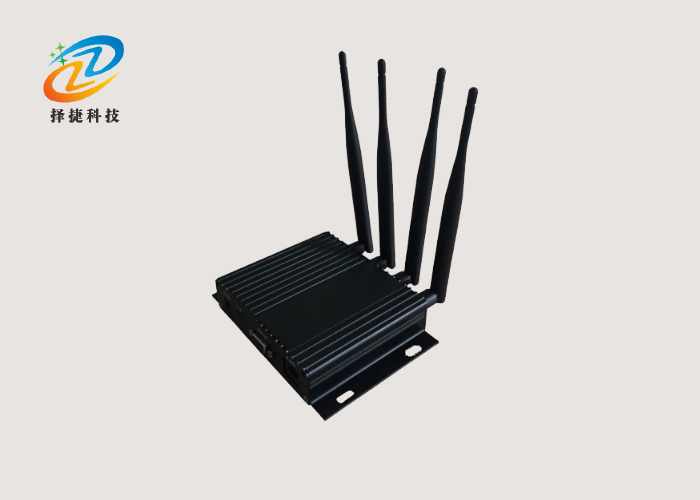
◆ ZJB-52 is a powerful, full-dimensional data reading and writing device. Its shell is made of solid aluminium alloy materials, with the ability to connect four external antennas, which enhances the read-card effect, effectively avoiding the creation of signal blind areas.
• The outer antenna is firmly connected to the SMA antenna connector through 50 om of a conaxial cable, and in order to ensure signal transmission effects, it is recommended that the length of the conaxis cables be as short as possible.
The product has a relatively low level of protection and therefore only applies to indoor environments.
◆ It has a wide range of applications in various areas, including but not limited to parking management, stereo garages, personnel attendance and location systems, door-to-door control systems, garage billing systems, car accounting management systems and customs cargo import/export security systems, which provide efficient and stable data reading and writing support for all scenarios.
Main product advantages
• Strong resistance to interference and protection from outside radio waves;
• Strong ability to read labels at the same time (high impact resistance);
• A buffer zone with 2000 labels;
• High water-resistant: IP56 (indoor use);
• Read labels at a adjustable distance of 0-100 metres (using software settings);
• Multiple interfaces, easy to use;
• Support for relay output;
• No external connection, all interfaces are integrated on the equipment.
Usage method
◆ Step: Open the packaging and take an inventory of quantities;
◆ Step 2: Get a computer and an RS232 serial cable (USB-to-RS232 cable), then connect the computer to the device.
◆ Step 3: Install all 4 omnidirectional antennas on the reader/writer.
◆ Fourth step: connect the connector to the power plug and insert the DC plug into the large device;
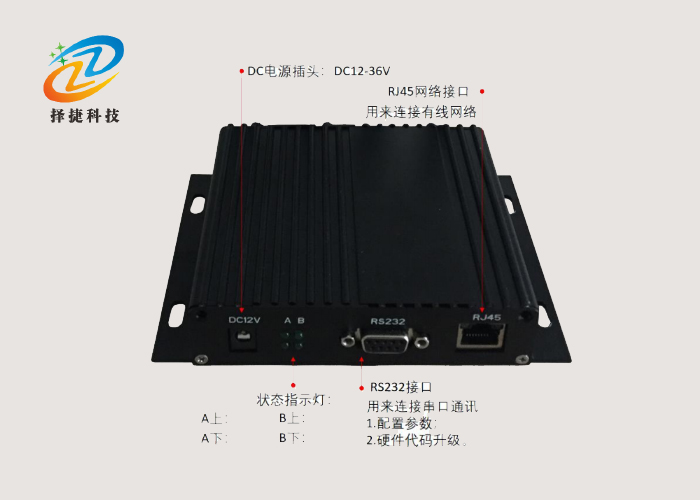
◆ Step 5: Check whether the power indicator lights up (the indicator below A).
◆ Step 6: Check the device status indicator. If it flashes, the device is operating normally.
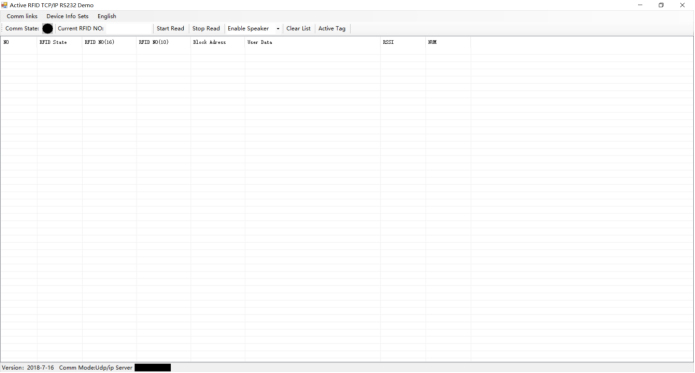
◆ Step 7: Run the demo software (rfid_tcp_com_demo.exe). The corresponding screen appears:
Interface definition
• The communication interface is based on the RJ11 port of 6 Pin. Signals are defined as follows:
• Citation foot number 1: signal name GND, not in direction, not specified;
• Citation foot number 2: signal name GND, not in direction, not in point;
• Foot 3 quote: signal name system occupancy, no direction, which means that it cannot be connected to other equipment;
• Footage number 4: signal name RS_TX, in direction of O, indicating RS232 sent;
• Footage number 5: signal name system occupancy, no direction, indicating that it cannot be connected to other equipment;
• Citation foot number 6: Signal name RS_RX, direction I, indicates RS232 receiver.
Description of the indicator
◆ A (lower): Power-based indicators;
◆ B (intermediate): normal working lights;
◆ C (upside): Receive correct labels.
List of product containers
ZZJB-52OO ZOK ZOO ZOPERATORS: 1 SKBO;
• AC-DC9V1A power adapter: 1;
• 6 core RJ11 trans-shipment lines: 1;
• Qualifications: 1.
Daily maintenance
The equipment is small power and not easily usable.
◆ 1 No signlights on:
• Lack of power supply;
Zoom-- Device lights are broken.
◆ 2 Normal working lights do not shine (often):
• The equipment is not in a normal working condition;
Zoom-- Device lights are broken.
◆ 3 RS 232 is not in normal communication:
◆ - The line is not plugged in;
◆ - The open COM mouth of the software is not consistent with the actual connected COM mouth;
◆ - The port rate of the COM mouth open by software is not consistent with the Porter rate set by the actual equipment;
Zoom - internal equipment malfunction.
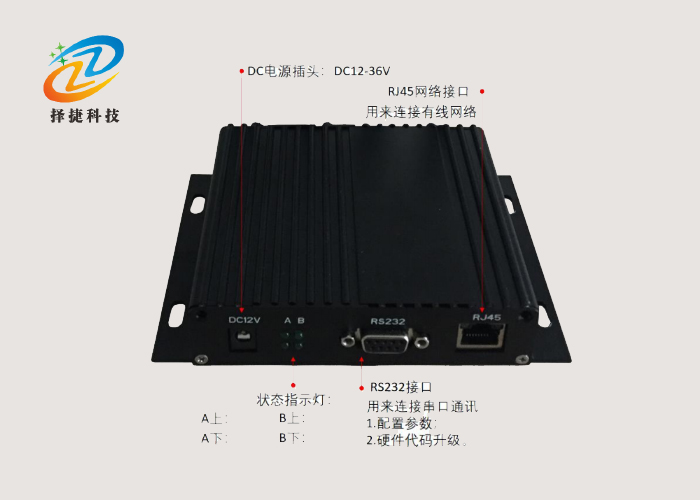
Front panel interface
Product Photos
Specifications
| Overall Dimensions | 100*145*30mm |
|---|---|
| Materials | Aluminium alloy |
| Antenna | 4 external connections |
| Weight | 0.2kg |
| DC Power Plugin | DC12-36V |
| Interface | RJ45 Network Interface, RS232 Interface |
| Applications | Garage management, stereo garages, personnel attendance... |
 Ms. Lei
 Mr. Pang